How to Optimize Your AI Content Strategy in 2024
Rysa AI Team

If you’re leading content and SEO at an SMB, you’ve probably felt the pressure to deliver more, faster—without bloating budgets. AI can absolutely help, but only when you connect it to clear goals, solid workflows, and practical guardrails. In this guide, I’ll walk you through how to bring AI into your content strategy in a way that actually moves the metrics that matter.
Understanding AI's Role in Content Strategy
Current trends in AI for marketing
Here’s what I’m seeing in the field with teams using AI day-to-day:
- From one-off drafting to end-to-end orchestration: Teams are moving beyond “generate a blog post” to full workflows—topic discovery, brief creation, brand-aligned drafting, internal linking, on-page optimization, and distribution all automated or semi-automated.
- Multimodal is going mainstream: AI helps repackage a long-form article into a short video script, social posts, and an email sequence with consistent tone and messaging.
- Entity-first SEO and topical authority: AI is getting better at identifying entities, subtopics, and internal linking opportunities, which helps you build deep clusters around your core topics.
- Search is shifting to AI summaries: With AI overviews surfacing in SERPs, winning the click is harder. Teams counter by focusing on experience-rich content (first-hand data, original visuals), and by optimizing for featured snippets and entities.
- Human-in-the-loop is non-negotiable: High-performing teams set up QA steps—factual checks, SME reviews, and brand voice guards—to keep quality high while AI does the heavy lifting.
- Content refresh at scale: AI is especially effective at refreshing aging content—rewriting sections, adding data, improving structure, and updating internal links.
Practical example: A three-person marketing team at a B2B SaaS scaled from 4 to 16 articles per month by using AI to create briefs, first drafts, and repurposed assets while keeping SME review and fact-checking human.
If you’re curious what that looks like day-to-day, picture a small team coordinating briefs, drafts, and edits around one table with a shared calendar. The setup is simple, but the structure keeps velocity high without sacrificing quality.
This kind of lightweight collaboration is usually enough to unlock throughput while AI handles repetitive steps in the background.
Importance of AI in content creation
Why AI is essential in 2024:
- Speed without chaos: AI reduces the time from brief to publish dramatically. A good workflow can take a first draft from hours to minutes.
- Coverage and consistency: You can tackle clusters thoroughly, keep tone consistent, and maintain quality across dozens of assets.
- Data-driven prioritization: AI can process your Search Console, GA4, and CRM data to flag content opportunities, decays, and quick wins faster than a manual audit.
Where it helps most:
- Topic selection: Predicting topics likely to rank and convert.
- Briefs: Building detailed, structured outlines that writers love.
- Drafting: Producing good first drafts to jumpstart the human editor.
- Optimization: Improving readability, adding semantically related terms, and suggesting internal links.
- Repurposing: Turning a hero piece into social threads, emails, and video scripts.
- Globalization: Localizing content at scale while preserving brand voice.
Key benefits of AI integration
- Higher output at lower cost per asset.
- Faster refresh cycles, leading to maintained rankings and traffic.
- Better internal linking and cluster completeness.
- Consistent brand voice across assets and channels.
- Clearer attribution from content to pipeline with structured data and standardized UTM practices.
- Happier writers who spend time on research, interviews, and POV—not repetitive rewriting.
Checklist: Decide where AI adds leverage first
- Choose one use case to start: briefs, refreshes, or repurposing.
- Define a QA step for that use case (SME review, fact-check, brand voice).
- Set a measurable target (e.g., cut time-to-draft by 50% within 30 days).
If you want a ready-to-use brief template, QA rubric, and internal linking checklist to pilot this in your next two pieces, ask the Rysa AI team for the “AI Content Starter Kit.” It’s the exact set of docs we use with SMB teams to get momentum quickly.
Setting Clear Goals for Your AI-Powered Strategy
Identifying content objectives
Start with outcomes, not outputs. Ask: what’s the business result you need content to drive this quarter?
Common objectives for SMB marketers:
- Organic growth: Increase qualified organic sessions by 30% in 90 days.
- Pipeline impact: Generate 50 demo requests from non-branded organic.
- Authority building: Own top 3 SERPs for 5 core topics with full clusters.
- Content velocity: Publish 12 quality assets per month with <20% rework rate.
- Refresh performance: Improve traffic to top 50 posts by 25% via updates.
Map objectives to content types:
- TOFU: Educational guides, AI-optimized listicles, checklists, industry explainers.
- MOFU: Comparisons, use-case pages, how-to guides with product context, webinars.
- BOFU: Case studies, ROI calculators, implementation guides, integration pages.
- Post-conversion: Onboarding content, playbooks, adoption emails.
OKR example:
- Objective: Establish topical authority for “marketing automation workflows.”
- Key results:
- Publish a 10-article cluster with internal linking in 6 weeks.
- Earn top 5 ranking for 6 target keywords (>1,000 MSV).
- Drive 25 demo requests from the cluster within 90 days.
A simple visual can help teams commit to targets and trade-offs. I like to put OKRs and weekly checkpoints on a whiteboard everyone can see.
Seeing the goals in writing keeps prioritization real and makes it easier to negotiate scope when surprises hit.
Aligning AI tools with goals
Pick tools for outcomes, not hype. Match capabilities to your goals:
- If your goal is traffic growth via topical authority:
- Needs: Topic modeling, entity extraction, cluster planning, internal link suggestions, schema generation.
- If your goal is conversions:
- Needs: CRO-friendly copy, product messaging consistency, CTA testing, headline variations, email follow-ups, dynamic content personalization.
- If your goal is velocity:
- Needs: Brief generators, brand voice templates, collaborative editing, fast model inference, CMS integrations.
- If your goal is content refresh:
- Needs: Decay detection, competitive gap analysis, automated rewrite suggestions, redirect and internal link fixes.
Comparison guide to pick the right capabilities quickly:
| Goal | Prioritize these AI capabilities | Primary success metrics | Workflow steps to automate |
|---|---|---|---|
| Topical authority and traffic growth | Topic/entity modeling, cluster planning, internal link mapping, schema generation | Non-branded sessions to cluster pages, top 10 rankings, entity coverage, internal links added | Generate clusters, create SEO briefs, build internal link maps, add/validate schema |
| Conversion lift (demos/trials) | CRO copywriting, consistent product messaging, CTA/headline testing, email follow-ups, personalization | Page CVR, SERP CTR, assisted pipeline, email reply/CTR | Produce copy variants, run CTA/title tests, generate nurture emails, insert dynamic content blocks |
| Production velocity | Brief templates, brand voice enforcement, section-level drafting, fast inference, CMS integration | Time-to-first-draft, edit ratio, publish cadence, cost per asset | One-click briefs, first drafts, approvals/QA routing, one-click publish |
| Content refresh/defend rankings | Decay detection, competitive gap analysis, rewrite suggestions, redirect and internal link fixes | Traffic uplift on refreshed pages, time-to-refresh, % pages recovered | Decay reports, rewrite proposals, internal link updates, 301s where needed |
Integration check:
- CMS (WordPress, Webflow, HubSpot) publishing and version control.
- GA4 and Search Console data ingestion.
- CRM/MA (HubSpot, Salesforce, Marketo) to connect content to pipeline.
- Project management (Asana, ClickUp, Airtable) for workflow automation.
- Slack/Email notifications for approvals and QA.
Decision tip: Run a 2-week pilot per tool focused on one goal. Score on usability, speed, SEO impact (draft quality, internal links, on-page suggestions), and integration smoothness.
Before you dive into cluster planning, this short video walks through how to structure SEO topic clusters from scratch and connect them to internal linking and on-page strategy. You’ll see a practical example you can mirror in a sheet or Airtable.
Use the framework from the video alongside the capability checklist above to pick the right tools and structure your clusters for faster wins.If you’d like a vendor-neutral capability scorecard and a 2-week pilot plan you can copy, ask Rysa AI for the “AI Content Pilot Kit.” It includes a scoring rubric, a sample prompt pack, and a rollout checklist.
Measuring success with AI metrics
Beyond traffic, measure AI’s operational impact:
Operational metrics:
- Time-to-first-draft: Target <30 minutes for standard posts.
- Human edit ratio: Aim for <30% major rewrites after 4 weeks of tuning.
- Factual error rate: Keep under 2% with mandatory source citations.
- Brand voice score: Internal rubric (tone, audience, POV) averaging ≥4/5.
- Publication velocity: Cadence per week vs. plan; missed deadlines.
- Cost per asset: Blend of tool cost + human hours; benchmark against prior baseline.
- Refresh cycle time: Time from decay detection to update shipped.
Outcome metrics:
- Non-branded organic sessions to target pages.
- Rankings for cluster keywords and entity coverage.
- CTR from SERP (optimize titles/meta with AI variants).
- On-page engagement: scroll depth, time on page, return visits.
- Conversions: demos, trials, content-assisted revenue.
- Assisted pipeline: content touched in journeys prior to SQL.
Simple ROI model:
- Content value = (Incremental non-branded sessions × CVR × Avg deal value × Close rate)
- ROI = (Content value – Total content cost) / Total content cost
Set a monthly review cadence. If an AI workflow isn’t moving one of these numbers after 6–8 weeks, rework prompts, training, or the review steps.
Selecting the Right AI Tools for Your Needs
Evaluating AI tools by feature
Group features by job-to-be-done:
Research and planning:
- Keyword and entity clustering
- SERP analysis and content gap detection
- Competitive outlines and link profiles
- Audience and persona insights
Creation and editing:
- Brand voice templates and style guides
- Structured brief and outline generation
- Long-form drafting with section-level controls
- Source citations and fact-check prompts
- Plagiarism and duplication checks
- Multilingual/localization support
Optimization:
- On-page SEO recommendations (H-tags, semantically related terms)
- Internal linking suggestions based on entities and authority
- Schema markup generation (Article, FAQ, HowTo, Product)
- Image suggestions and alt text
- Readability and UX checks
Distribution and repurposing:
- Social snippets, carousels, and threads
- Email sequences and nurture content
- Video scripts and show notes
- UTM generation and channel tagging
Workflow and governance:
- Roles, permissions, and approvals
- Version control and change history
- Custom fields (intent, funnel stage, CTA, offer tag)
- CMS integrations and one-click publish
- API/webhooks for custom automations
- Data privacy controls, SOC 2/ISO certifications
Look for:
- Model flexibility (GPT-4o, Claude 3.5, Llama options; route by task)
- Prompt templates and reusable frameworks
- Project-level brand voice and banned claims lists
- Editorial rubrics embedded in the tool
- Transparent pricing (credit/tokens) and throttling controls
Red flags:
- Black-box scoring with no explainability
- Aggressive data retention without opt-out
- No audit logs for compliance
- Weak source attribution or no citation support
Understanding user requirements
Before choosing, gather requirements from the people who will use it daily:
- Content strategist:
- Needs cluster planning, content matrix views, prioritization by impact, and analytics.
- SEO lead:
- Needs entity analysis, internal linking recommendations, schema, and Search Console import.
- Writer/editor:
- Needs clean UI, outline control, draft quality, quick access to brand voice and examples.
- SME/reviewer:
- Needs simple review interface, inline comments, change tracking.
- Demand gen manager:
- Needs campaign alignment, UTM automation, CTA testing, integration with MA/CRM.
- Ops/IT:
- Needs SSO, permissions, data residency options, logs, and SLA.
Ask these questions:
- What’s our current bottleneck (briefing, drafting, QA, publishing)?
- Which integrations are non-negotiable?
- What’s the max acceptable edit rate for AI drafts?
- How will we train the model on our voice and claims?
- How will we maintain content governance (approvals, claims, disclaimers)?
Long-term considerations for tool selection
Plan for the next 12–24 months:
- Total cost of ownership:
- License + overages + model costs + implementation + training time.
- Vendor lock-in mitigation:
- Export formats, open APIs, bring-your-own-model options, data portability.
- Model resilience:
- Ability to swap models as pricing/quality evolves, per-task routing.
- Data security and compliance:
- Data residency, retention controls, SOC 2/ISO, PII handling, DPA availability.
- Governance at scale:
- Multi-brand workspaces, approval workflows, content archives, legal review.
- Globalization:
- Native localization workflows, multilingual SEO support, locale-specific schema.
- Analytics maturity:
- Content attribution models, custom dashboards, experimentation support.
- Roadmap and support:
- Public changelog, training resources, success team access, SLA response times.
Pilot tip: Set a 30-day pilot with 3–5 representative content pieces. Compare before/after on time-to-draft, edit ratio, and organic performance.
Implementing AI in Your Content Workflow
Mapping AI to content tasks
Here’s a practical end-to-end workflow you can adopt and adapt:
- Strategy and planning
- Audit: Use AI to summarize GA4/GSC data and flag decaying pages, thin content, and quick wins.
- Topic modeling: Generate clusters around core entities; prioritize by potential impact.
- Content calendar: Build an Airtable or Sheet with fields for goal, intent, persona, funnel stage, target keyword, cluster, CTA, and due dates.
- Brief creation
- Outline: AI produces H2/H3 structure, questions to answer, and entity checklist.
- Evidence: Prompt AI to request citations or SMEs for any claims; add required sources.
- Angle: Include POV (e.g., “practical playbook for SMBs”), examples to include, and product touchpoints.
- Drafting
- First draft: AI produces a structured draft with scannable sections, bullets, and examples.
- Brand voice: Apply your style template (tone, banned phrases, product naming).
- Compliance: Insert standard disclaimers and claim guardrails.
- SME review and fact-check
- SME pass: Review for accuracy and unique insights (replace generics with specifics).
- Fact-check: Require links for stats and define a “no-sources, no-stats” rule.
- Edits: Use tracked suggestions; keep a change log.
- SEO optimization
- On-page: AI suggests title tags, H1 variations, meta descriptions, and schema.
- Entities: Ensure coverage of related entities and synonyms; avoid keyword stuffing.
- Internal links: AI proposes links to and from relevant cluster pages.
- Visuals and media
- Images: Generate or select images; write alt text; compress; add captions where helpful.
- Video/audio: Auto-generate scripts from the article; schedule recording if needed.
- Accessibility: Check contrast, alt text, and heading order.
- Publishing and distribution
- CMS: Push directly with version control.
- Repurpose: Auto-create social posts, email, and a short video script.
- UTM governance: Standardize source/medium/campaign; tag content IDs.
- Measurement and refresh
- Track: Annotate the publish date and major updates in GA4.
- Review: 14-, 30-, and 60-day checkpoints; compare to benchmarks.
- Refresh: AI proposes updates at 90 days or when decay is detected.
If your process lives in sticky notes or a project tool, map each step to a clear column and SLA so no piece stalls. A simple visual like a Kanban board keeps the team aligned.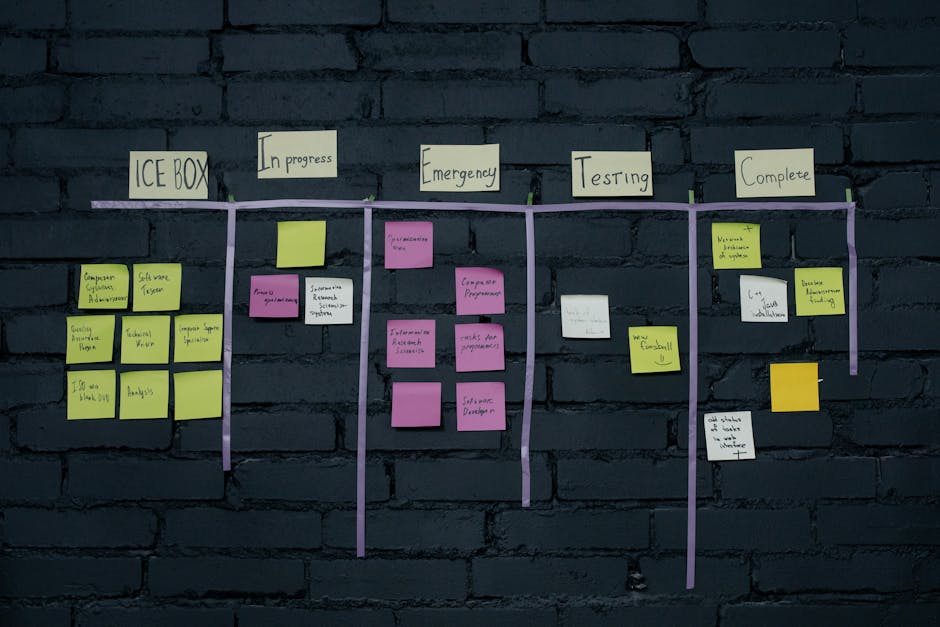
You don’t need fancy software—just consistent stages from brief to publish to refresh.
30-60-90 rollout plan:
- Days 1–30: Pilot briefs + drafts on two topics; build style guide; set QA rubric; integrate CMS.
- Days 31–60: Add internal linking and repurposing workflows; standardize UTMs; launch dashboard.
- Days 61–90: Scale to full cluster production; introduce refresh automation; run first A/B title test.
Want this rollout prebuilt? Ask Rysa AI for the “90-Day AI Content Launch Plan.” It includes an Airtable/Asana board, prompt library, QA rubric, and sample automations you can drop into your stack.
Training your team on AI tools
Treat AI enablement like onboarding a new teammate.
Create a practical playbook:
- Brand voice sheet: Tone descriptors, sentence length, pronouns, banned phrases, examples of “do/don’t.”
- Prompt library:
- Brief prompt: “Create an SEO brief for [topic] targeting [persona] at [funnel stage]. Include entities, questions, outline, and internal link suggestions.”
- Draft prompt: “Write a [1,800–2,200]-word article in [brand voice], include specific examples relevant to SMB B2B SaaS, avoid generic advice, and propose 3 data points with suggested sources.”
- Refresh prompt: “Audit this article for 2024 relevance. Propose updates, new entities, internal links, and schema adjustments.”
- Repurpose prompt: “Turn this article into a 6-post LinkedIn thread, 2 email blurbs, and a 60-second video script.”
- QA rubric:
- Accuracy (with citations), originality, brand voice, structure, clarity, SEO completeness, helpfulness.
- Score 1–5; require ≥4 to publish.
Cadence and coaching:
- Weekly 30-minute calibration: Review two AI drafts, discuss edits, update prompts.
- Writer pairing: New users co-create with a power user for the first 3 pieces.
- Error log: Track common issues (e.g., redundant phrasing, soft claims) and update guardrails.
Cultural norms:
- “AI drafts; humans decide.” Encourage SMEs to add first-hand insights and examples.
- Celebrate “deletes”: Cutting fluff is a win; reward concise, useful content.
- Keep a change history for transparency and learning.
Ensuring seamless integration
Connect your content stack so data flows both ways.
Core integrations:
- CMS: WordPress/Webflow/HubSpot with versioning and scheduled publishing.
- Analytics: GA4 and Search Console; pass content IDs via UTM to MA/CRM.
- Project management: Asana/ClickUp/Airtable to manage statuses and SLAs.
- Communication: Slack notifications for “draft ready,” “needs SME,” “ready to publish.”
- DAM: Centralize assets; enforce alt text and naming conventions.
Data hygiene and tracking:
- Use a content ID: Include in URL, UTM, and CRM notes for end-to-end tracking.
- Standard UTMs: source=organic|email|social, medium=content|post|video, campaign=[cluster-name], content=[content-id].
- Annotate in GA4: Publish dates, major refreshes, title changes.
Change management:
- Staging environment: Test prompts, templates, and integrations before production.
- Permissions: Writers can draft; editors approve; SEO lead controls schema and links.
- Escalation path: If AI output fails quality checks twice, route to senior editor.
Governance:
- Claims library: Approved messages and proof points with sources and dates.
- Legal review: Fast lane for content with risk (comparisons, benchmarks).
- Privacy: Ensure tools don’t store sensitive data; disable training on your content if needed.
Monitoring and Enhancing Your AI Content Strategy
Analyzing AI performance data
Set up a focused dashboard—don’t drown in metrics. The essentials:
Production metrics:
- Pieces created per week, by type (new, refresh, repurpose)
- Time-to-first-draft and time-to-publish
- Edit ratio and QA pass rate
- Cost per asset and total cost per month
SEO and engagement:
- Non-branded organic sessions by cluster and landing page
- SERP positions for target keywords and coverage of entities
- CTR by title variant; test AI-generated titles monthly
- Engagement: time on page, scroll depth, bounce rate
Conversion impact:
- Assisted conversions and pipeline attributed to content
- Demo/trial conversions by content type and cluster
- Email CTRs and reply rates for repurposed assets
Most teams benefit from a single source of truth that unites production, SEO, and conversion metrics. Start simple, then expand as needs grow.
When everyone can see the same charts, prioritization decisions get faster and less political.
If you want a fast refresher on pulling insights from Google Search Console, this walkthrough shows how to find decaying pages, identify quick-win keywords, and translate those into action. It’s a solid 10-minute primer for monthly reviews.
Run the steps from the video, then map your findings to the production metrics and refresh cadence above to keep the pipeline moving.How to use the data:
- Run cohort analyses by publish month to understand ramp-up and decay.
- Compare AI-assisted vs. human-only pieces for performance gaps; adjust prompts or QA accordingly.
- Flag outliers: Top performers become templates; laggards are refreshed or redirected.
Experimentation:
- Titles and meta: A/B test high-traffic pages; aim for +10–20% CTR gains.
- Intros and H2 order: Test scannability improvements for engagement.
- CTAs: Test placement, wording, and offer relevance; align with persona and funnel stage.
Cadence:
- Weekly: Production and quality metrics; unblock bottlenecks.
- Monthly: SEO and conversion performance; decide on refreshes and expansions.
- Quarterly: Strategic review; re-evaluate clusters, models, and tools.
If you’d like a Looker Studio dashboard template that ties GA4, GSC, and your content IDs together, Rysa AI can share a copy you can adapt in under an hour.
Adapting to new AI trends
2024 reality: things change fast. You don’t need to chase every shiny object, but you do need an evaluation rhythm.
What to watch:
- Search changes: AI overviews and how they extract/attribute info; adjust content to answer clearly with evidence and structured data.
- Multimodal: Use visuals and short videos to increase SERP and social reach.
- Model landscape: New models may offer better cost/speed for specific tasks.
- Compliance and governance: Evolving regulations around AI-generated content and disclosures.
Evaluation sprint template (monthly):
- Identify 1–2 new features or models to test (e.g., faster draft model, better internal linking).
- Define a success metric (e.g., −30% draft time or +15% internal link relevance).
- Run a 10–article test; document results; roll out or discard.
Guardrails when adopting new features:
- Always run in staging with human review first.
- Do not deploy new models to BOFU pages or regulated content without legal review.
- Keep a rollback plan and version snapshots.
Continuous learning and adjustment
Treat your AI content system like a product. Iterate deliberately.
Review cycles:
- Post-mortem for each campaign/cluster: What worked, what didn’t, what to change.
- Update your prompt library monthly based on edits and performance.
- Maintain an internal wiki with examples of “gold standard” content.
Content maintenance:
- Refresh cadence: Review top 20% of traffic-driving posts every 90 days.
- Decay detection: If a page drops >20% traffic or rank, triage:
- Update stats and examples
- Strengthen entities and internal links
- Add FAQ or comparison sections
- Improve visuals and schema
- Consolidation: Merge thin/overlapping posts; set 301s; update internal links.
People and process:
- Keep SMEs involved with structured interviews and quotes; AI shouldn’t replace their firsthand insights.
- Rotate team members through QA to prevent blind spots.
- Recognize the wins: Share success metrics and standout examples across the org.
Practical end-of-quarter checklist:
- Archive prompts that underperform; promote the top 5 to default templates.
- Rebalance the content mix (new vs. refresh vs. repurpose) based on pipeline impact.
- Re-validate your keyword/entity map against actual demand and conversions.
- Audit your internal link structure; add links from high-authority pages to new assets.
- Review cost per asset and model usage; optimize for price-performance.
Final quick-start plan if you’re starting from scratch this month:
- Week 1: Define one goal (e.g., increase qualified organic demos). Pick a core topic. Build a simple content matrix (10 pages) with clear CTAs.
- Week 2: Pilot AI for briefs and first drafts on two articles. Create a brand voice template and QA rubric. Connect CMS and GA4.
- Week 3: Add internal linking, schema, and repurposing. Publish and annotate. Start a dashboard.
- Week 4: Review performance; refine prompts; plan a 10-article cluster sprint for next month. Establish a 90-day refresh schedule.
When you frame AI as an accelerant to a well-defined strategy—not a replacement for it—you get the best of both worlds: consistent, scalable content production and real business outcomes. That’s AI content strategy optimization done right in 2024.
Conclusion
If you remember nothing else, remember this: AI only works when it serves clear goals and runs inside a disciplined workflow with human judgment at the right checkpoints. Here’s the short version of how to make that real:
- Start with outcomes: Set OKRs tied to traffic, conversions, or authority—not just “more content.” Map those to TOFU/MOFU/BOFU assets and clusters.
- Pick capabilities, not hype: Choose tools for topic/entity modeling, drafting, optimization, and repurposing based on your goals. Pilot for 2–4 weeks and score impact.
- Operationalize the workflow: Strategy → briefs → drafts → SME/QA → SEO → visuals → publish/repurpose → measure/refresh. Define SLAs so nothing stalls.
- Build guardrails: Brand voice templates, claims library, “no-sources, no-stats,” permissions, and approvals. Integrate CMS, GA4/GSC, CRM, and PM tools for traceability.
- Measure what matters: Track time-to-draft, edit ratio, cost per asset, rankings, non-branded sessions, CTR, and conversions. Review monthly and adjust.
- Iterate like a product: Update prompts, templates, and playbooks based on performance. Refresh high-impact content on a predictable cadence.
Do this, and AI becomes an accelerant—helping a small team ship higher-quality content faster, defend rankings with smart refreshes, and turn content into pipeline. If you want hands-on help turning this playbook into your day-to-day process, book a quick working session with Rysa AI—we’ll map your first cluster, set up a pilot, and get your team shipping within two weeks.









